
Create Professional Barcodes Directly in Photoshop, Illustrator & InDesign
74 barcode formats — CODE128, EAN-13, QR Code, Data Matrix, UPC, GS1, and more. Live preview, batch generation from Excel/CSV, and one-click place or export as SVG, PNG, JPG, or WEBP.
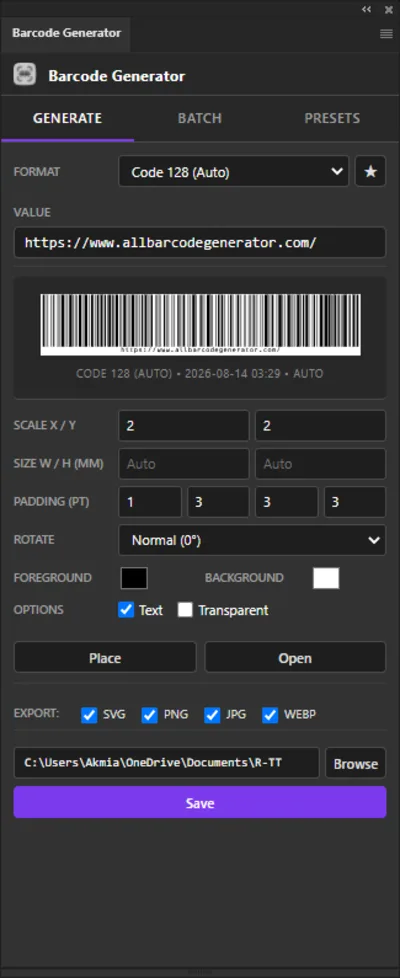
Single barcode with live preview
Stop Wasting Time on Web Generators
Every time you leave your design app to make a barcode, you lose focus and waste time.
- Google "free barcode generator"
- Type data, guess the settings, download SVG
- Import the file into Illustrator
- Realize it's the wrong size or color
- Go back to the browser and start over
- Open the panel right inside Photoshop, Illustrator, or InDesign
- Pick your format — star it as a favorite for next time
- Enter data and instantly see the live preview
- Tweak colors, scale, padding, and rotation with sliders
- Click Place, Save, or Run Batch — done in seconds.
Everything You Need to Generate Barcodes
Built as a native Adobe CEP panel — no browser, no Figma, no external tools. Works directly inside Photoshop, Illustrator, and InDesign.
Batch Barcode Generation
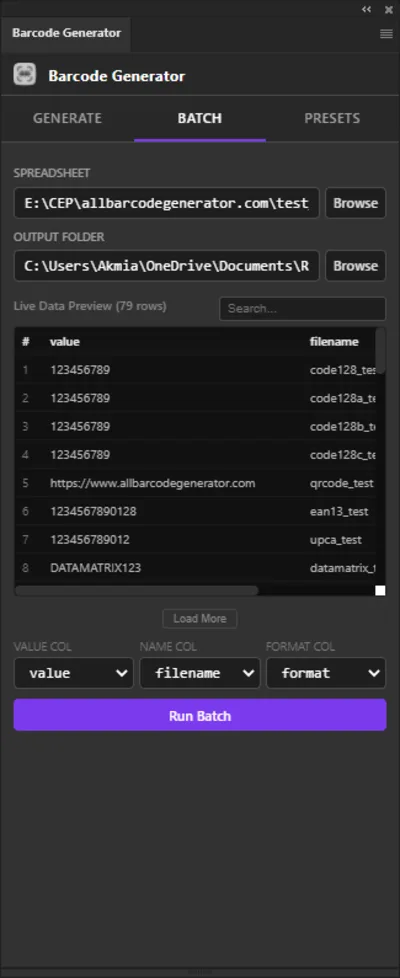
Point the extension at an Excel (XLSX, XLS), ODS, CSV, or TSV spreadsheet and generate hundreds of barcodes in one click.
Place Embedded
Place the generated SVG barcode directly as an embedded smart object into your open Photoshop, Illustrator, or InDesign document.
Multi-Format Export
Save as SVG, JPG, PNG, and WEBP (WEBP in Photoshop) simultaneously. Choose any combination per barcode.
Save Presets
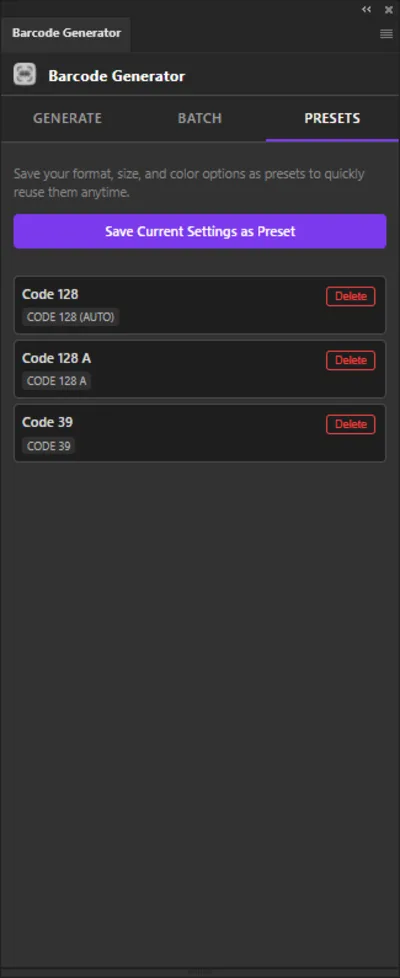
Save your favorite dimensions, colors, and format settings as reusable presets to speed up your recurring workflows.
Smart Data Builders
Quickly generate complex barcodes using built-in templates for Wi-Fi networks, vCards, Emails, SMS, and GS1 identifiers.
Full Customization
Control width, height, scale, padding, rotation, transparent backgrounds, and human-readable text inclusion — all from the panel.
Color Picker
Set bar and background colors with an integrated color picker. No guesswork — the live preview updates instantly.
Favorite Formats
Star your most-used barcode formats and they instantly appear at the top of the list — no more scrolling through 74 types every time.
Live SVG Preview
The panel renders a real-time barcode preview before you place or save anything. What you see is what you get.
INTRODUCING
Watch the intro to Barcode Generator and see what's inside.
Who Is This For?
Professional tools for designers working in print, packaging, and high-volume production.
Packaging & Retail
Generate exact UPC-A and EAN-13 barcodes for product packaging, boxes, and retail tags without leaving your dieline file.
Publishing & Media
Create ISBN and ISSN barcodes with 2-digit or 5-digit price add-ons directly onto your book and magazine covers.
Logistics & Warehousing
Generate Code 128, ITF-14, and GS1-128 barcodes for shipping labels, pallets, and internal inventory tracking.
Agencies & Events
Use the Batch feature to instantly generate hundreds of unique QR codes or Code 39 barcodes for event tickets and ID badges.
74 Barcode Formats Supported
Powered by the full BWIPP engine. Retail, GS1, 2D, postal, medical, publishing, and industrial — natively inside Adobe CC.
Four Output Formats, Zero Compromise
Export your barcodes in any combination of formats in a single save operation.
Scalable vector — sharp at any print size. Ideal for press-ready artwork.
Compressed raster image. Fast to share and widely compatible with all applications.
Lossless raster with transparency support. Best for overlays and digital assets.
Modern web format with superior compression. Smaller files, same quality. WEBP export requires Photoshop.
Supported Adobe Applications
The extension runs as a native panel inside these Creative Cloud applications.
Adobe Photoshop
PHSP / PHXS
CC 2015 and later
Adobe Illustrator
ILST
CC 2015 and later
Adobe InDesign
IDSN
CC 2015 and later
Up and Running in 3 Steps
Follow along — each step has a short video showing you exactly what to do.
Download the ZXP
Purchase and download the ZXP installer file from the Gumroad store page.

Install with ZXP Installer
Open Anastasiy's Extension Manager or ZXPInstaller, drag in the ZXP file, and click Install.

Open the Panel
Restart Photoshop, Illustrator, or InDesign. Find "Barcode Generator" under Window > Extensions.

Simple, Transparent Pricing
Stop paying monthly subscriptions for basic design tools.
Lifetime License
Pay once. Use forever on Mac and Windows.
Works in Adobe Photoshop, Illustrator & InDesign across supported versions on Windows & macOS.
One-time activation via Gumroad — no serials to manage.
Frequently Asked Questions
Is this a subscription or a one-time payment?
One-time payment of $20. No monthly fees, no hidden costs — your license includes lifetime updates.
Which Adobe applications are supported?
Adobe Photoshop (CC 2015 and later), Adobe Illustrator (CC 2015 and later), and Adobe InDesign (CC 2015 and later) on Windows and macOS.
How many barcode types are supported?
74 formats: Code 128 (Auto/A/B/C), Code 39, EAN-13/8, UPC-A/E, ISBN/ISSN/ISMN, ITF-14, GS1-128 and GS1 DataBar, QR Code, Data Matrix, PDF417, Aztec, HIBC medical codes, Pharmacode, postal standards, and more.
Do I need an internet connection to generate barcodes?
After activation, the plugin works offline with a 30-day license re-verification grace period. Your barcode data and document contents never leave your computer.
Are the barcodes high enough quality for professional printing?
Yes. SVG export and Place Embedded give resolution-independent vector output that stays sharp at any size for packaging and press-ready artwork.
Can I use these barcodes for commercial client work?
Yes. Any barcode you generate is yours to use in commercial projects, product packaging, and client deliverables. No royalties or usage limits.
Does it calculate check digits automatically?
Yes. For formats that require validation (EAN-13, UPC-A, ISBN), the built-in BWIPP engine calculates the correct check digit, which helps produce valid, scannable barcodes.
Can I generate multiple barcodes at once?
Yes. Batch reads a spreadsheet (Excel XLSX/XLS, ODS, CSV, TSV) and generates one barcode per row into your chosen output folder.
What export formats are supported?
SVG, JPG, PNG, and WEBP in any combination per save. WEBP export requires Photoshop.
How do I install the extension?
Download the ZXP, install with Anastasiy’s Extension Manager or ZXPInstaller, restart your Adobe app, then open Window > Extensions > Barcode Generator. See the installation guide for details.
Still stuck? Contact support or read the installation guide.
Ready to speed up your workflow?
Join professional designers who have stopped leaving Adobe Creative Cloud to generate their barcodes. Get the plugin today and streamline your production.
Get Barcode Generator — $20